Architectural millwork, assembled in 3D before anything is cut
Drop a 2D DWG, DXF or PDF of your millwork. Assemblability puts every part together in 3D, checks clashes, gaps, contacts and missing or extra parts against your bill of materials and your company standards, then produces the shop kit. Your company's own engineer reviews and approves every job.
- PDF, DWG and DXF in
- Findings in feet, inches and fractions
- Your engineer signs off every job
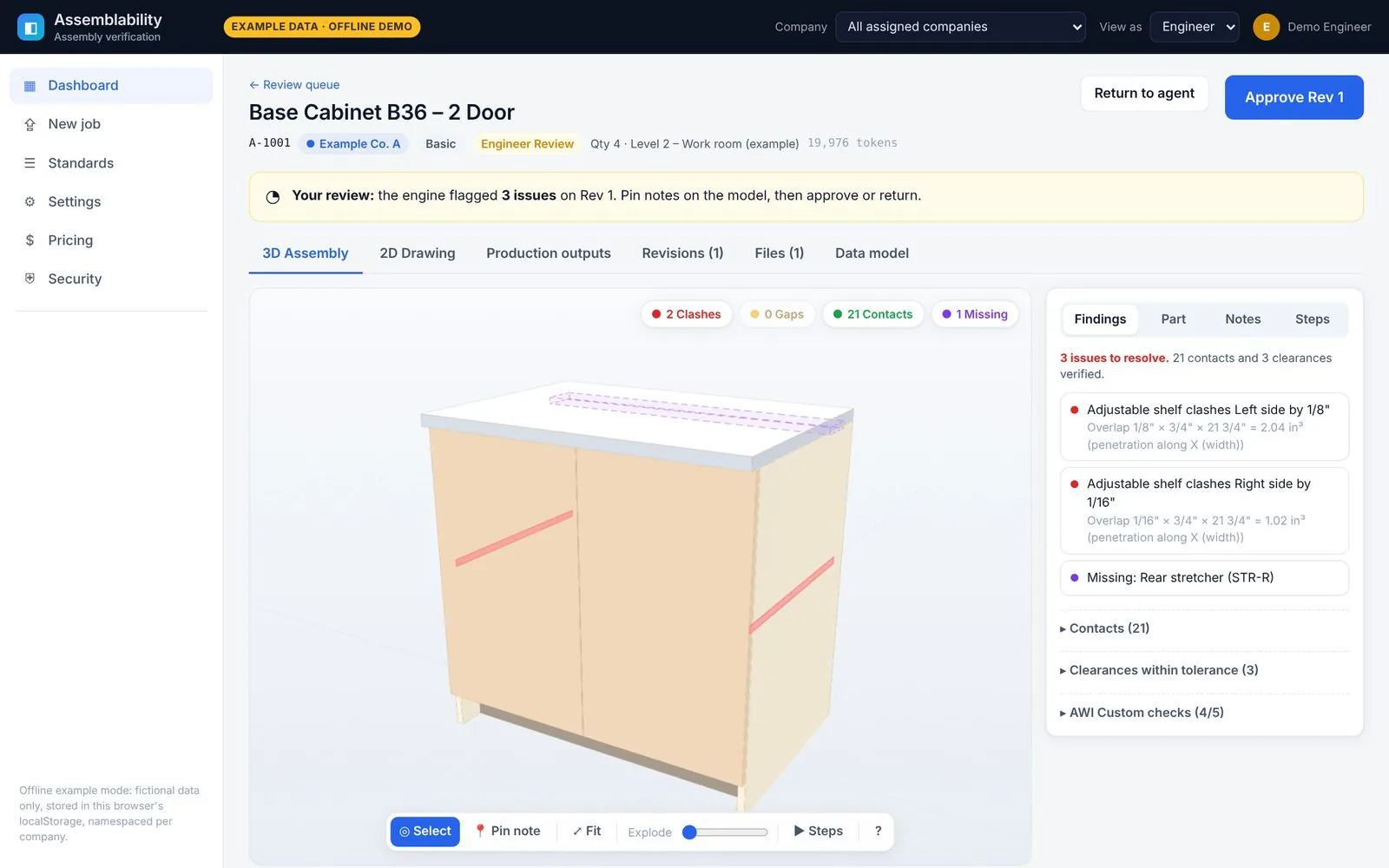
Product screens show fictional example data.
Most fit problems are found on the shop floor. That's the most expensive place to find them.
Drawings arrive in every format and level of finish. Parts get re-keyed by hand, and nobody puts the whole cabinet together until it's already built.
Parts that don't fit
A shelf that's 1/8" too wide, a back that runs into the bottom, a stretcher nobody drew. You find out at assembly.
Rework and recuts
Every miss means new material, more machine time and a slipped install date, plus the back-and-forth to work out what changed.
Manual cut lists
Cut lists, labels and shipping lists are typed by hand from drawings, so every handoff is another chance for a typo.
Find fit problems on the screen, not at assembly
Every part is placed in 3D and checked against its neighbours. Intended reveals and clearances from your standards are not flagged as errors.
3D assembly check
Every part is placed in 3D and checked against its neighbours. Findings are written in shop units (feet, inches and fractions), and clicking one zooms the model to it.
- Clashes with penetration depth and overlap volume
- Gaps checked against your reveal and clearance rules, so an intended 1/8" door reveal isn't flagged
- Contacts, floating parts and missing or extra parts against the bill of materials
- Exploded view and a step-by-step assembly sequence
Exploded view
Assembly sequence
Upload & ingest
Review loop with pins
Feedback lives on the model, not in an inbox. Your engineer pins a note on the part that's wrong and returns the job. The fix comes back as a new revision for another look.
- Pin notes directly on 3D parts or 2D drawings
- Return with selected findings, or approve. Approval is blocked while issues are open, unless your engineer overrides with a written note
- Revision history shows what changed between rounds
- No client chat: file drop plus annotated feedback only
Return with findings
Rev 2, all clear
Revision history
Four steps from drawing to shop kit
No chat threads and no email chains. You drop files and get annotated feedback on the drawing itself.
Drop files
Upload PDF, DWG or DXF. Everything is converted into one internal format.
- DXF read directly
- DWG converted on our server
- PDF pages and text extracted
3D assembly check
The parts are put together in 3D and checked against each other and your bill of materials.
- Clashes and gaps
- Contact faces
- Missing or extra parts
- Assembly sequence
Your engineer reviews
Your company's engineer pins notes on the model, then approves the job or returns it. Nothing ships without their sign-off. Fixes come back as a new revision.
- Annotated feedback, no chat
- Full revision history
Production kit
Approval freezes the model and generates the shop package.
- Saw cut list and CNC nest
- Work orders
- Labels and shipping ticket per finished product
A shop-ready kit from the approved model
Approval freezes the model, and the shop package is generated from that approved version.
Production outputs
Approval freezes the model, and the shop package is generated from that approved version.
- Saw cut list (saw parts only) and a separate CNC nest on 4×8 sheets
- Work orders per product
- Labels, shipping ticket and shipping checklist: one line per finished product, never per part. A cabinet ships as one cabinet.
- CSV download and print views
Send what you have
Pick a tier based on how finished your drawings are. The platform does the work; your company's engineer reviews and approves every job, whatever the tier.
Basic
You send a ready DWG or DXF.
- 3D assembly check of your parts
- Your engineer's review and approval
- Full production kit
Premium
You send a raw PDF. The platform builds the drawing and the cut list, then your engineer reviews it.
- Drawing and parts model created for you from the PDF
- 3D assembly check and your engineer's review
- Full production kit
Hybrid
A mix of ready drawings and raw PDFs.
- Premium processing only where you need it
- Same review loop and your engineer's sign-off
- Full production kit
Explore Assemblability
Casework and cabinets
Cut lists, CNC nests, labels and shipping tickets per finished cabinet.
DWG, DXF and PDF assembly check
What happens to each file format, from upload to verified 3D assembly.
Security and privacy
Per-company encryption, signed expiring downloads and a tamper-evident audit log.
Tiers and pricing
Basic, Premium and Hybrid tiers, with a monthly drawing allowance.
FAQ
File formats, approvals, privacy, integrations and the pilot.
Request a demo
Tell us a little about your shop. We're onboarding a small number of millwork and casework teams.
Thanks for your interest.
Nothing was sent or stored. Online requests open soon; a contact address will be published on this page.