Drop your 2D DWG or DXF, or just a PDF. Get a verified 3D assembly and a shop-ready kit.
Assemblability assembles every part in 3D before anything is cut. It flags clashes, gaps and missing parts, then produces cut lists, labels and shipping tickets. No CAD file? Send the PDF and the platform builds the drawing and cut list (Premium), then your engineer reviews it. Nothing ships without your engineer's sign-off.
- PDF, DWG and DXF in
- Your engineer signs off every job
- Each company's files encrypted and kept apart
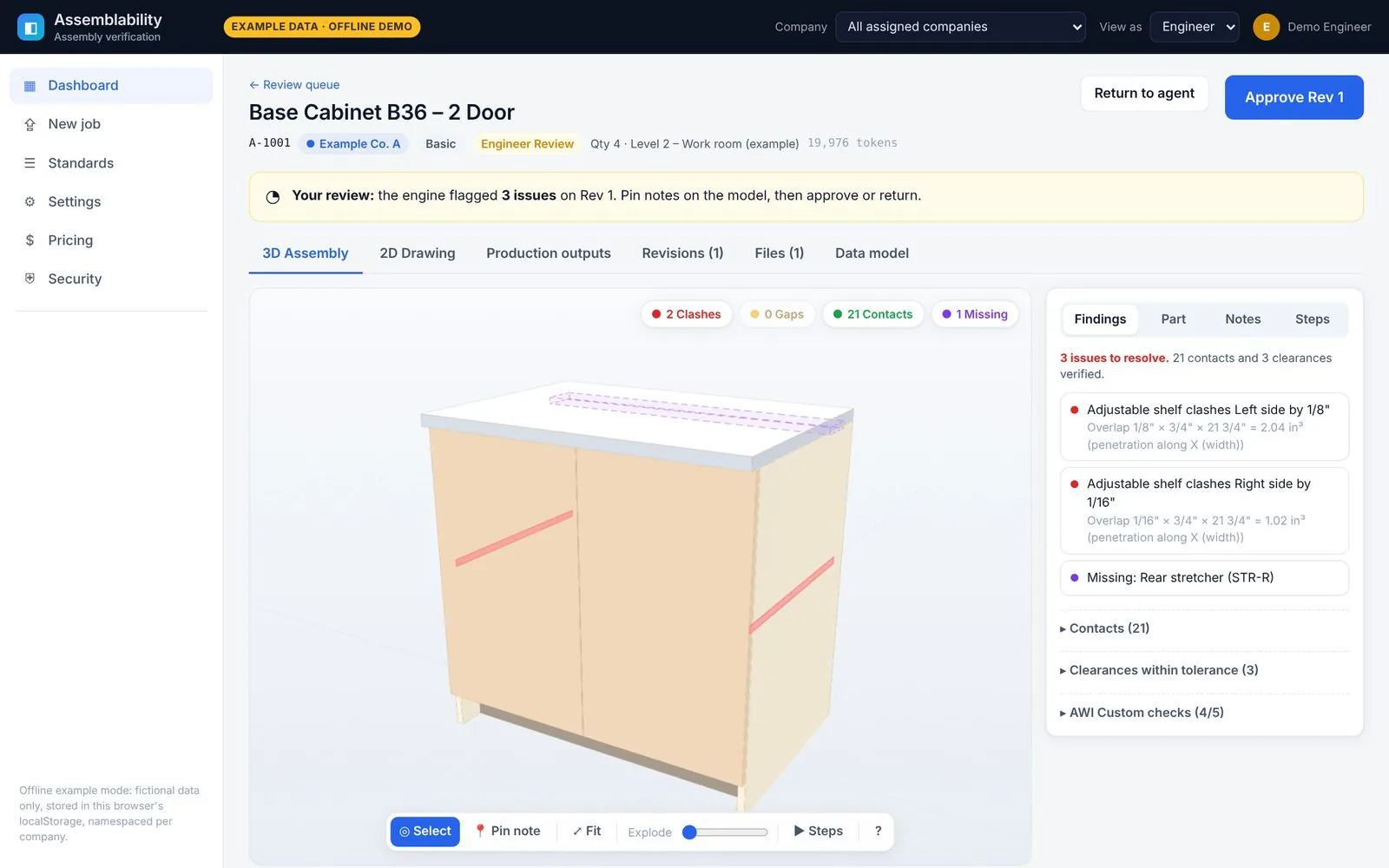
Product screens show fictional example data.
Most fit problems are found on the shop floor. That's the most expensive place to find them.
Drawings arrive in every format and level of finish. Parts get re-keyed by hand, and nobody puts the whole cabinet together until it's already built.
Parts that don't fit
A shelf that's 1/8" too wide, a back that runs into the bottom, a stretcher nobody drew. You find out at assembly.
Rework and recuts
Every miss means new material, more machine time and a slipped install date, plus the back-and-forth to work out what changed.
Manual cut lists
Cut lists, labels and shipping lists are typed by hand from drawings, so every handoff is another chance for a typo.
Four steps from drawing to shop kit
No chat threads and no email chains. You drop files and get annotated feedback on the drawing itself.
Drop files
Upload PDF, DWG or DXF. Everything is converted into one internal format.
- DXF read directly
- DWG converted on our server
- PDF pages and text extracted
3D assembly check
The parts are put together in 3D and checked against each other and your bill of materials.
- Clashes and gaps
- Contact faces
- Missing or extra parts
- Assembly sequence
Your engineer reviews
Your company's engineer pins notes on the model, then approves the job or returns it. Nothing ships without their sign-off. Fixes come back as a new revision.
- Annotated feedback, no chat
- Full revision history
Production kit
Approval freezes the model and generates the shop package.
- Saw cut list and CNC nest
- Work orders
- Labels and shipping ticket per finished product
Built around one question: will it go together?
These are real screens from the platform, showing fictional example jobs.
3D assembly check
Every part is placed in 3D and checked against its neighbours. Findings are written in shop units (feet, inches and fractions), and clicking one zooms the model to it.
- Clashes with penetration depth and overlap volume
- Gaps checked against your reveal and clearance rules, so an intended 1/8" door reveal isn't flagged
- Contacts, floating parts and missing or extra parts against the bill of materials
- Exploded view and a step-by-step assembly sequence
Exploded view
Assembly sequence
Upload & ingest
Review loop with pins
Feedback lives on the model, not in an inbox. Your engineer pins a note on the part that's wrong and returns the job. The fix comes back as a new revision for another look.
- Pin notes directly on 3D parts or 2D drawings
- Return with selected findings, or approve. Approval is blocked while issues are open, unless your engineer overrides with a written note
- Revision history shows what changed between rounds
- No client chat: file drop plus annotated feedback only
Return with findings
Rev 2, all clear
Revision history
Production outputs
Approval freezes the model, and the shop package is generated from that approved version.
- Saw cut list (saw parts only) and a separate CNC nest on 4×8 sheets
- Work orders per product
- Labels, shipping ticket and shipping checklist: one line per finished product, never per part. A cabinet ships as one cabinet.
- CSV download and print views
Dashboard and job queue
Every job sits on one board: Received, Processing, Engineer Review, Approved and Returned. Clients see their own progress as it happens. Your team sees where work is piling up.
- Job cards with tier, quantity, revision and fit status
- Client view shows only that company's jobs
- Internal view adds bottlenecks, queue depth and per-job processing usage
2D drawing viewer and light DXF editor
Check and correct the flat drawing without leaving the job.
- Measure in feet, inches and fractions, with endpoint snapping
- Dimension, select, move or correct an entity, and toggle layers
- Mark up with pins, boxes, clouds, arrows and text
- Save as DXF. Coming soon DWG export
Company standards
Each company sets its own rules once, and every job is checked and laid out against them. Standards stay inside that company's workspace.
- Quality grade (Economy, Custom, Premium) with AWI-inspired checks
- Door and drawer-front reveals, shelf clearances and scribe tolerances
- Materials, title block and drawing layout, label format, production kit and shipping list
The built-in checks are modelled on common AWI practice. They are not an AWI certification.
API and webhooks for your agents and systems
Connect AI agents, an ERP or your own scripts. A documented REST API (OpenAPI spec) covers jobs, uploads, status, annotations, approvals and outputs.
- Signed webhooks (HMAC-SHA256, with automatic retries) on every status change
- Agent endpoint: post results and the job goes back to engineer review as a new revision
- Scoped API keys per company that expire and can be revoked. Keys can't approve jobs.
- Webhook payloads carry IDs, status and counts only, never file content or names
job.receivedjob.processingjob.engineer_reviewjob.approvedjob.returnedannotation.added
There are no prebuilt ERP connectors yet. The REST API is the integration point.
# Create a job, upload a drawing, submit it
POST /api/v1/jobs              {"name":"EXAMPLE job","tier":"premium"}
POST /api/v1/jobs/{id}/files   # multipart: PDF, DWG or DXF
POST /api/v1/jobs/{id}/submit

# Your agent posts a fixed revision
POST /api/v1/agent/jobs/{id}/results
     {"parts":[…], "note":"fixed shelf width",
      "resolvedAnnotationIds":["ann_…"]}

# After approval
GET  /api/v1/jobs/{id}/outputs/shipping-ticket

# Every webhook is signed
X-Assemblability-Event: job.returned
X-Assemblability-Signature: t=…,v1=<HMAC-SHA256>
Send what you have
Pick a tier based on how finished your drawings are. The platform does the work; your company's engineer reviews and approves every job, whatever the tier.
Basic
You send a ready DWG or DXF.
- 3D assembly check of your parts
- Your engineer's review and approval
- Full production kit
Premium
You send a raw PDF. The platform builds the drawing and the cut list, then your engineer reviews it.
- Drawing and parts model created for you from the PDF
- 3D assembly check and your engineer's review
- Full production kit
Hybrid
A mix of ready drawings and raw PDFs.
- Premium processing only where you need it
- Same review loop and your engineer's sign-off
- Full production kit
Your drawings are confidential. We built it that way from day one.
Each company's workspace is sealed off from every other company's: separate encrypted storage, separate keys, and checks on the server for every request.
Encrypted at rest, per company
Files and sensitive fields are encrypted with AES-256-GCM. Each company has its own key, and each file has its own key on top of that. Each company's files sit in separate storage, with no shared paths.
Encrypted in transit
HTTPS (TLS 1.2+) with HSTS and secure, same-site session cookies. Every change request in the browser also requires an anti-forgery token.
Least-privilege roles
Client, company admin, company engineer and admin roles, enforced by the server. Your company's engineer reviews and approves jobs, and only sees companies they're assigned to. Admin access to file content requires a stated reason, and that reason is logged.
Signed, expiring downloads
Every download goes through a signed link tied to the person who requested it. Links expire in 2 minutes by default. A forwarded or altered link doesn't work.
Tamper-evident audit log
Every view, download and edit is recorded in an append-only, hash-chained log. Admins can verify the chain at any time. Each file shows its own activity history.
Nothing leaves without your say-so
No file is sent to an outside AI model or service unless your company turns external processing on. It's off by default. Logs never contain file contents or filenames.
Secure deletion and retention
Deleting a file destroys its encryption key, so the data can't be recovered. Each company sets automatic deletion after 30, 90, 180 or 365 days, or keeps files.
Isolation, tested automatically
An automated test suite tries to reach another company's files and standards through every API route, as a client, an API key and an engineer. Every attempt must fail and be logged.
Scoped API keys
Each API key belongs to one company, with explicit permissions and an expiry date, and it can be revoked. Agents get no drawing content unless your company allows it.
Privacy settings: external processing is off by default
Another company's job link: access denied, and the attempt is logged
Coming soon
We'd rather tell you now than have you find out later. These aren't in place yet:
- Two-factor sign-in (MFA) and single sign-on (SSO) Coming soon
- Encryption keys held in an external key-management service Coming soon
- Sandboxed file converters and malware scanning of uploads Coming soon
We don't claim any third-party security certification. A written security model is available to pilot participants.
Simple, predictable structure
A monthly plan with a drawing allowance and seats for your team. Pricing is shared during the pilot.
Monthly base
One plan per company, priced by service tier.
Drawing allowance
A set number of drawings included each month (for example, 100 a month).
Per-drawing extras
Drawings beyond the allowance are billed per drawing, at a rate set by the tier.
| Plan element | How it works |
|---|---|
| Seats: up to 5 | Small teams: estimators, a project manager and a shop lead |
| Seats: 6–15 | Growing teams across several projects |
| Seats: 16+ | Custom, negotiated |
| Basic tier | Lowest base and per-drawing rate. You supply ready DWG or DXF files |
| Premium tier | Higher rate. Covers building the drawing and cut list from your raw PDF |
| Hybrid tier | In between. Premium processing only on the drawings that need it |
| Your engineer's approval | Required on every job, in every tier. Nothing ships without their sign-off |
Up and running in four plain steps
A short guided setup with sensible defaults. You can skip any step and come back to it later.
Set up your company
Name it and pick a default quality grade.
Upload your standards
Add your title block, labels, kit and shipping formats, or start from the defaults.
Invite your team
Add seats and choose each person's role, including your engineer, who reviews every job.
Drop your first job
Upload a drawing and watch it move through the queue.
Questions, answered
Which file formats can I upload?
PDF, DWG and DXF. DXF files are read directly. DWG files are converted on our own server with an open-source converter, then read like a DXF. For PDFs we extract the pages, text and vector linework. You can export drawings as DXF. DWG export is coming soon.
Who approves my jobs?
Your company's own engineer, on every job and in every tier. The platform and its agents do the assembly work; nothing is released until your engineer reviews the 3D assembly check, pins notes if needed, and signs off. They can approve the job or return it with those notes. Approval is blocked while issues are open, unless your engineer overrides with a written reason.
Is there a chat?
No, by design. You drop files and get annotated feedback pinned on the drawing or 3D model, so every comment points at the exact part it's about.
Can another company see my drawings or standards?
No. Each company's files sit in separate encrypted storage under its own keys, and the server checks every request against your company. Links to another company's job return "not found", and the attempt is logged. Automated tests check this on every API route.
Request a demo
Tell us a little about your shop. We're onboarding a small number of millwork and casework teams.
Thanks for your interest.
Nothing was sent or stored. Online requests open soon; a contact address will be published on this page.